Dawnline

Dawnline

**Your OpenWrt router as a private VPN for the people you choose.** Latest release CI Downloads License
OpenWrt 24.10 OpenWrt 25.12 AmneziaWG 2.0 and 3.1 [**Quick start**](#-quick-start)  ·  [**Live demo**](https://dawnline-demo.vercel.app)  ·  [Features](#-features)  ·  [How it works](#-how-it-works)  ·  [Screenshots](#-a-closer-look)  ·  [FAQ](#-faq)  ·  [Development](#-development) **English**  ·  [Русский](README_ru.md)

Dawnline runs an [AmneziaWG] server on your OpenWrt router and gives every person you invite **a personal link**. They open it, **add their own phones and computers** and connect with AmneziaVPN, AmneziaWG or WireGuard. You decide **what each of them may reach** (the home network, the internet, or both) and **for how long and how much**.

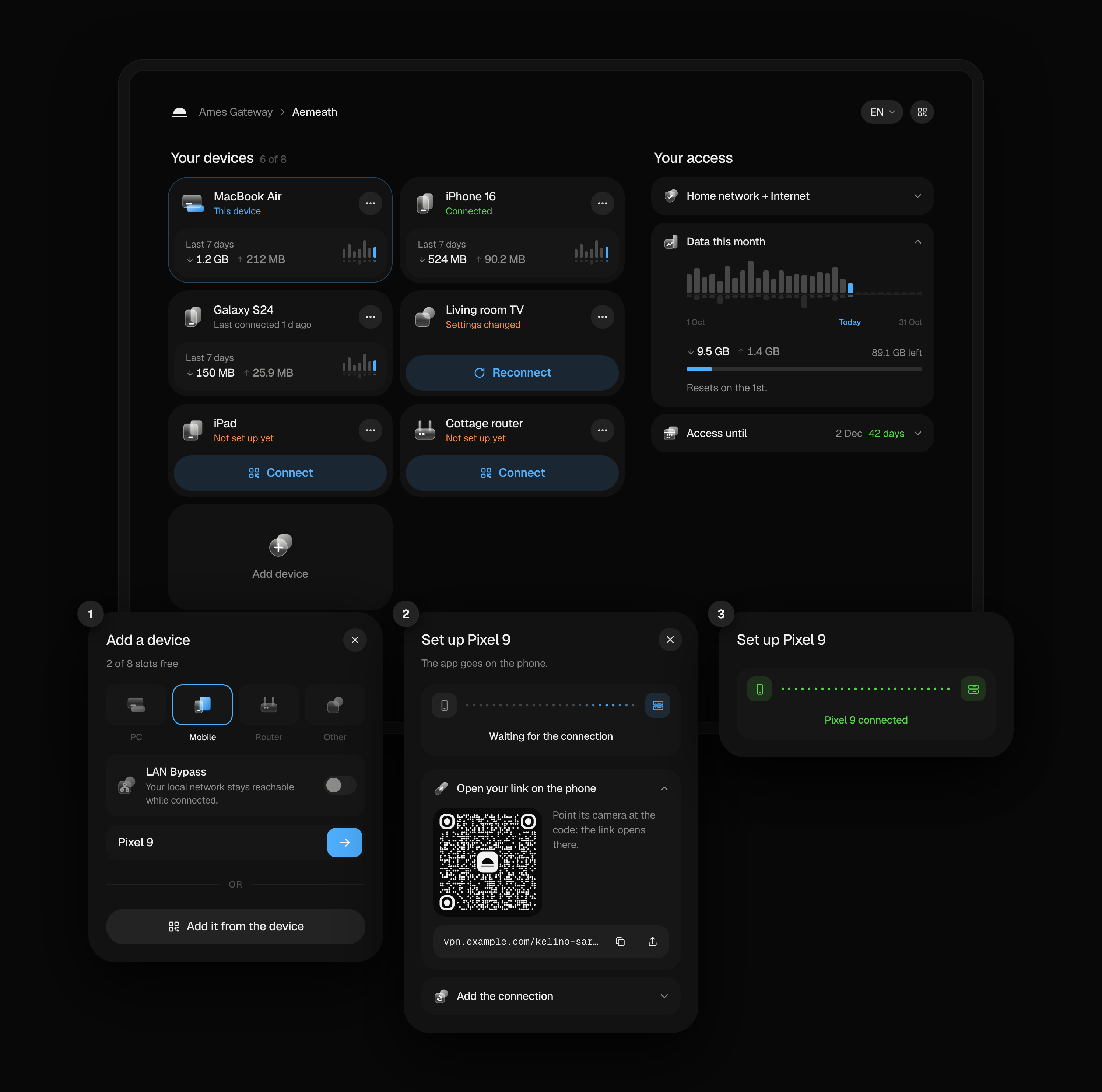
The personal portal: devices and access, and adding a phone in three steps
A person's own page: their devices and access. Adding a phone takes three steps, and the page sees it connect. Try it in the live demo: nothing installs and nothing connects.

## 💡 Why Dawnline? Sharing a home VPN usually means making a config file by hand, sending it over a messenger and hoping nobody shares it further. Dawnline turns that around: | | A VPN by hand | With Dawnline | |---|---|---| | **Setting up a device** | You make a config and send it | They add it themselves from their link | | **Who can do what** | Everyone gets the same | Home, internet or both, per person | | **Ending access** | Find and delete their peers | A date, a data limit, or one click | | **Knowing what goes on** | Read `wg show` | Who is online, traffic, places, a log | | **When something breaks** | You find out from them | A watchdog notices and repairs it | It is the successor of [Liminal]: the same idea rebuilt around people instead of peers, with a personal portal, limits, live traffic and a LuCI admin that follows a modern design. ## 🚀 Quick start 1. **Install** on the router (it asks before it changes anything): ```sh sh -c "$(wget -qO- https://raw.githubusercontent.com/tickcount/luci-app-dawnline/main/install.sh)" ``` 2. **Set up** in LuCI: Services › Dawnline, and follow the wizard. It suggests the port, the public address and the networks. 3. **Invite** someone: Add person, then send them the link or the invite card with its QR code. They do the rest. > [!TIP] > Behind Cloudflare, give the portal a port Cloudflare proxies: 2053, 2083, > 2087, 2096 or 8443. ## ✨ Features

🔗 A link, not an account

Three words, like vpn.example.com/kamiro-telosu-bavine. The link is the key: no sign-up, no password, and a new link locks the old one out at once.

📱 Their own devices

People add, rename and remove devices up to their limit. Adding one walks them through it: the right app, then a QR code, a link, a key or a file.

👥 People, not peers

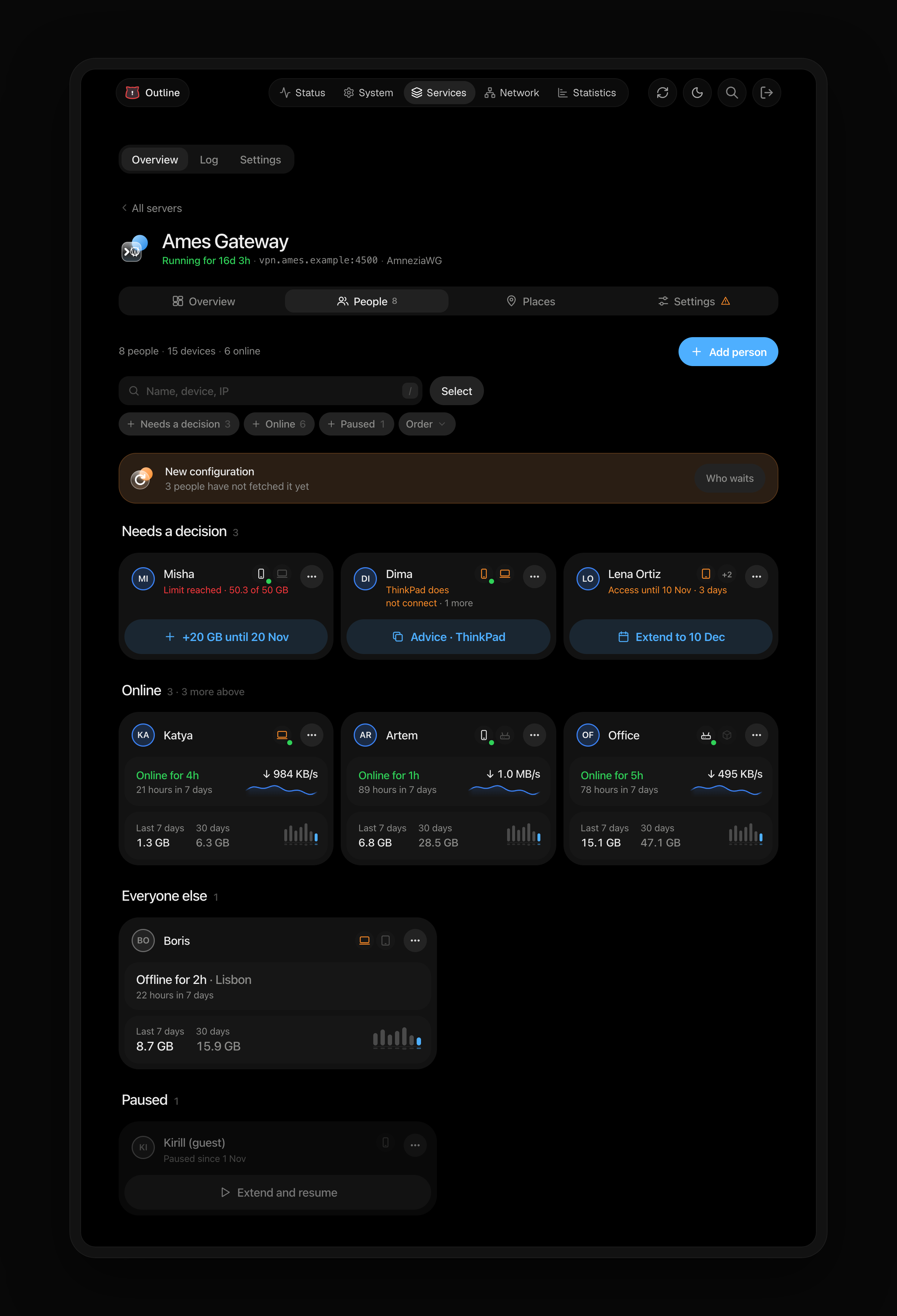
A card for each person that says only what matters in their state: who waits for a decision and the one button that settles it, who is online since when and how fast, what each moved this week and this month. Filter, order, search by name, device or IP; a person or a device opens as a page of its own and Back returns you to the same place, and the same people stand on a map of where they connect from.

🧭 Who reaches what

The home network, the internet or both; only some networks or devices at home (a NAS, Home Assistant). Family sees family, guests see guests.

⏳ Limits

End dates, monthly or total data limits, a pause button. Changes apply at once, without dropping anyone else's connection.

🕶️ Disguise

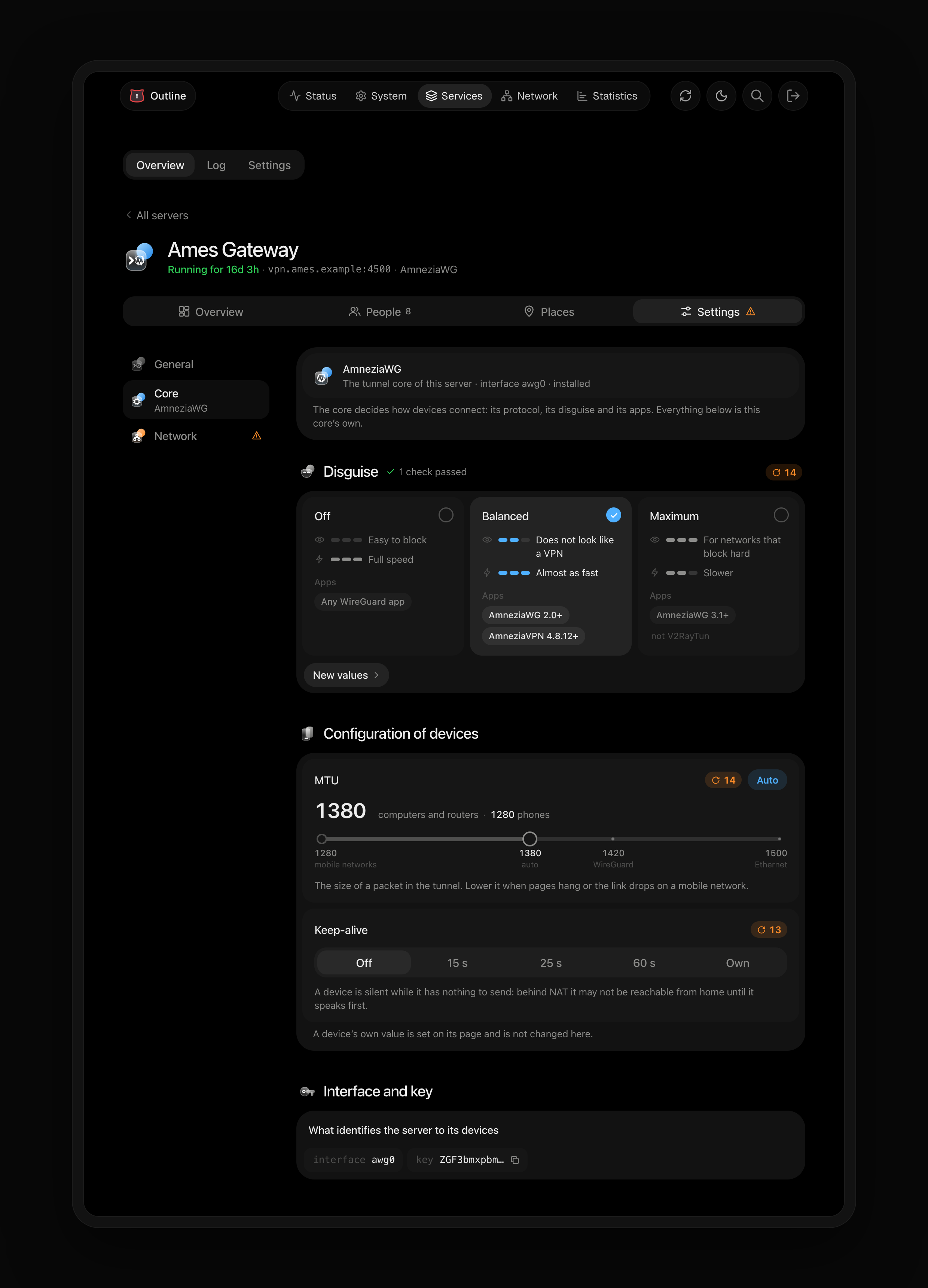
Presets that make the VPN traffic harder to spot and block, with what each one needs from the apps.

🏠 Internet like a home device

Turn it on and people's devices go online the way the devices at home do, so your proxies, ad and DNS filters cover them too. Off by default: it costs speed.

🗺️ Overview and places

One page that says whether everything works: the health checks, who waits for a decision, who is online, speed now and who moves most, today by the hour, the last 30 days against the 30 before, and the servers with who still has to take a new configuration. Where people connect from, at city level, is a map in People.

🩺 Repairs itself

Health checks with one-click fixes, and a watchdog that checks the tunnels, access rules and portal every minute and mends them.

📦 Updates and backups

Dawnline and AmneziaWG built for your firmware in one place; nightly backups, and export and import to move to another router.

🌐 English and Russian

The portal follows the visitor's language and switches in its header. The admin pages and the router's messages come in Russian with the luci-i18n-dawnline-ru package.

## 🧩 How it works ```mermaid flowchart LR you(["🛠️ You, in LuCI"]) -- "add a person" --> link["🔗 Their link"] link -- "they open it" --> portal["📱 Their portal"] portal -- "add a device" --> app["App and connection"] app == "AmneziaWG tunnel" ==> router["🌅 Dawnline
on your router"] router -- "if allowed" --> home["🏠 Home network"] router -- "if allowed" --> net["🌍 Internet"] ``` 1. **You add a person** in LuCI and choose what they may reach, their device limit, an end date or a data limit. 2. **They open their link** on any device. The portal is theirs alone: it shows their devices and their access; access and limits stay yours to change. 3. **They add a device.** The portal points them to the app for that system and hands over the connection; the router gives each device its own keys. 4. **The device connects** through the router's AmneziaWG server, and Dawnline lets through what that person may reach, counts their traffic and keeps to their limits. ## 📸 A closer look

People: who needs a decision, who is online, everyone else, who is paused
People: who needs a decision, who is online, everyone else, who is paused.
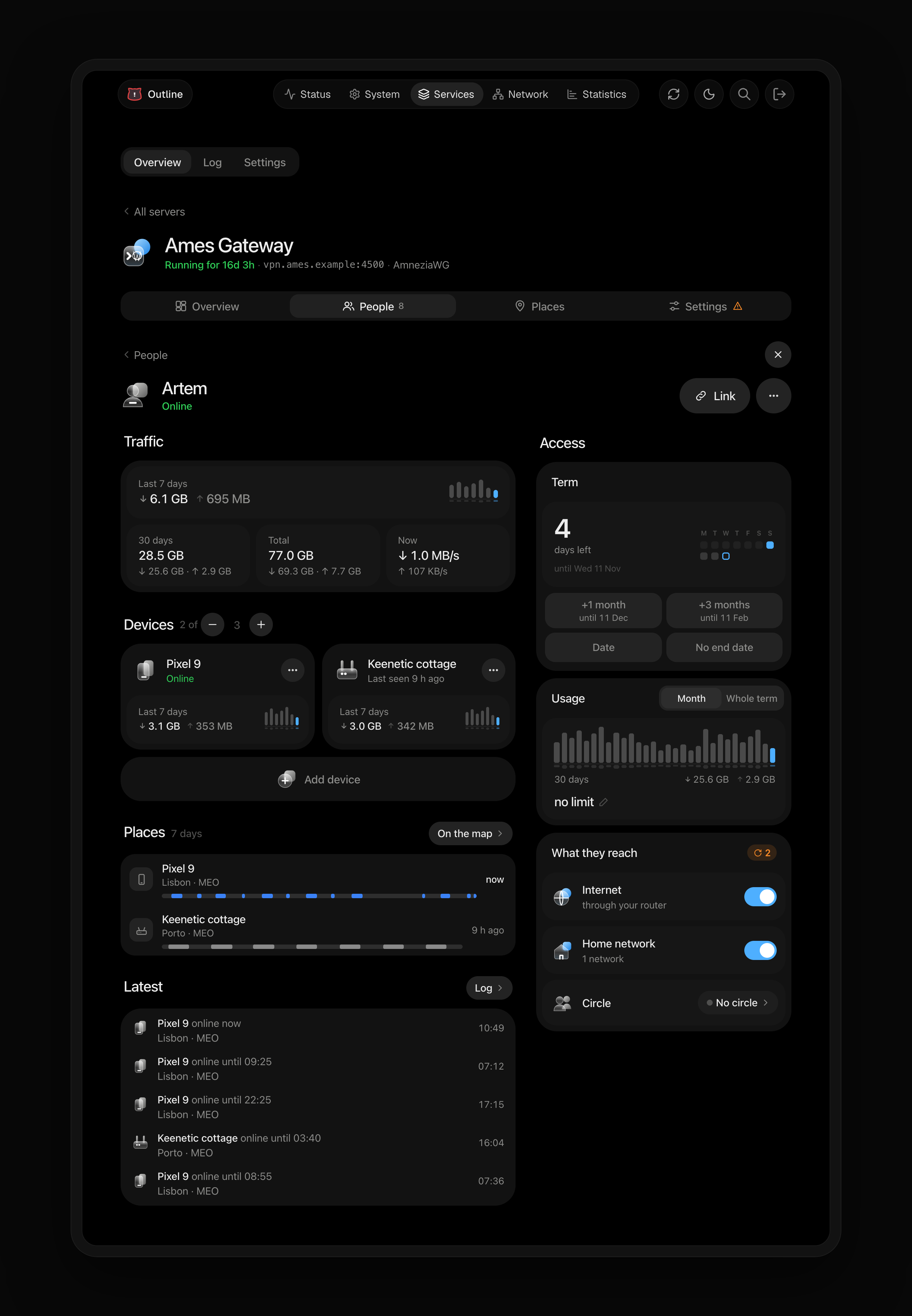
A person: their traffic, devices, places, term, usage and what they reach

A person: their traffic, devices and places; the term, the usage and what they reach.

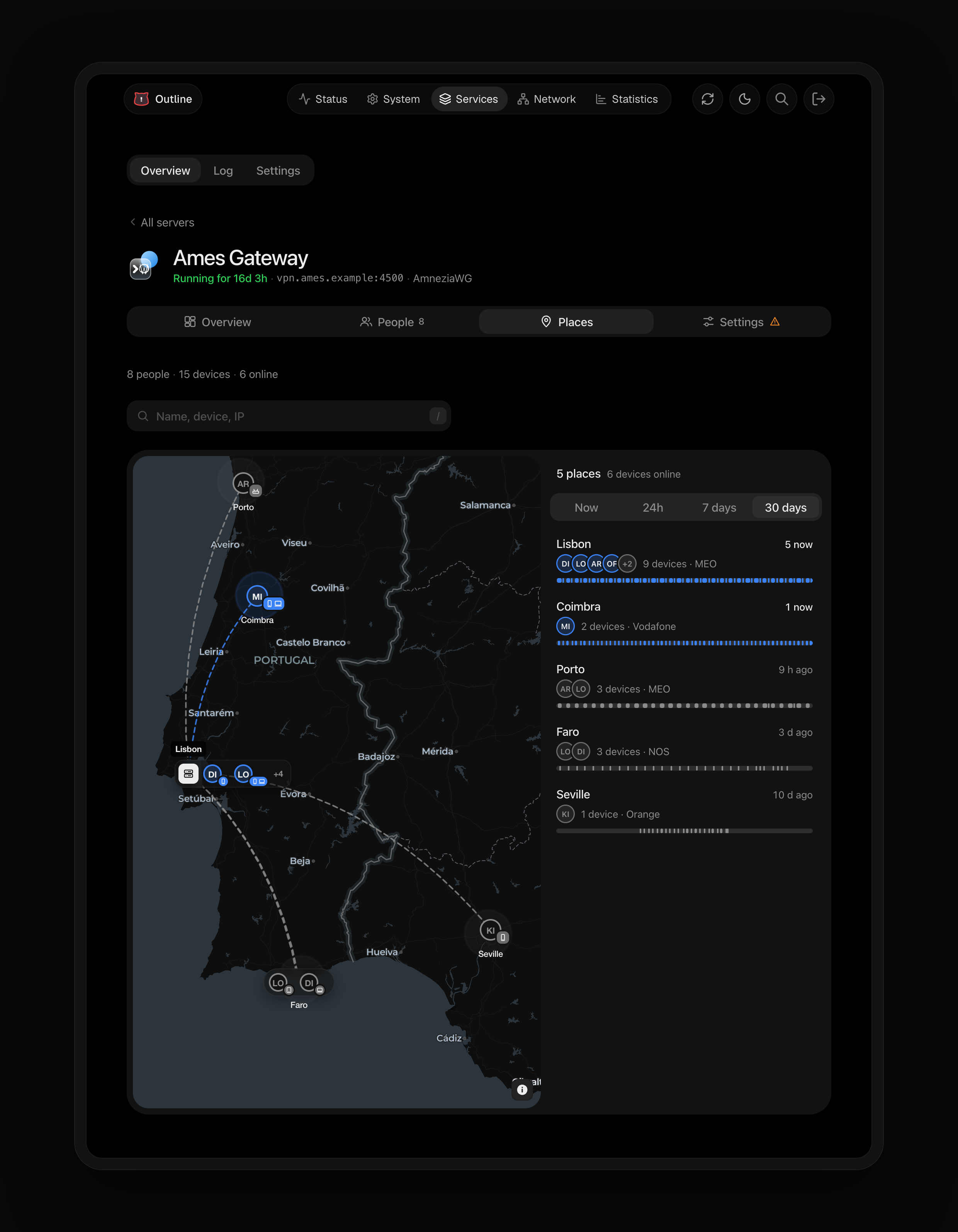
Places: where devices connect from, on the map and in a list

Places: where devices connect from, now and over the last 30 days.

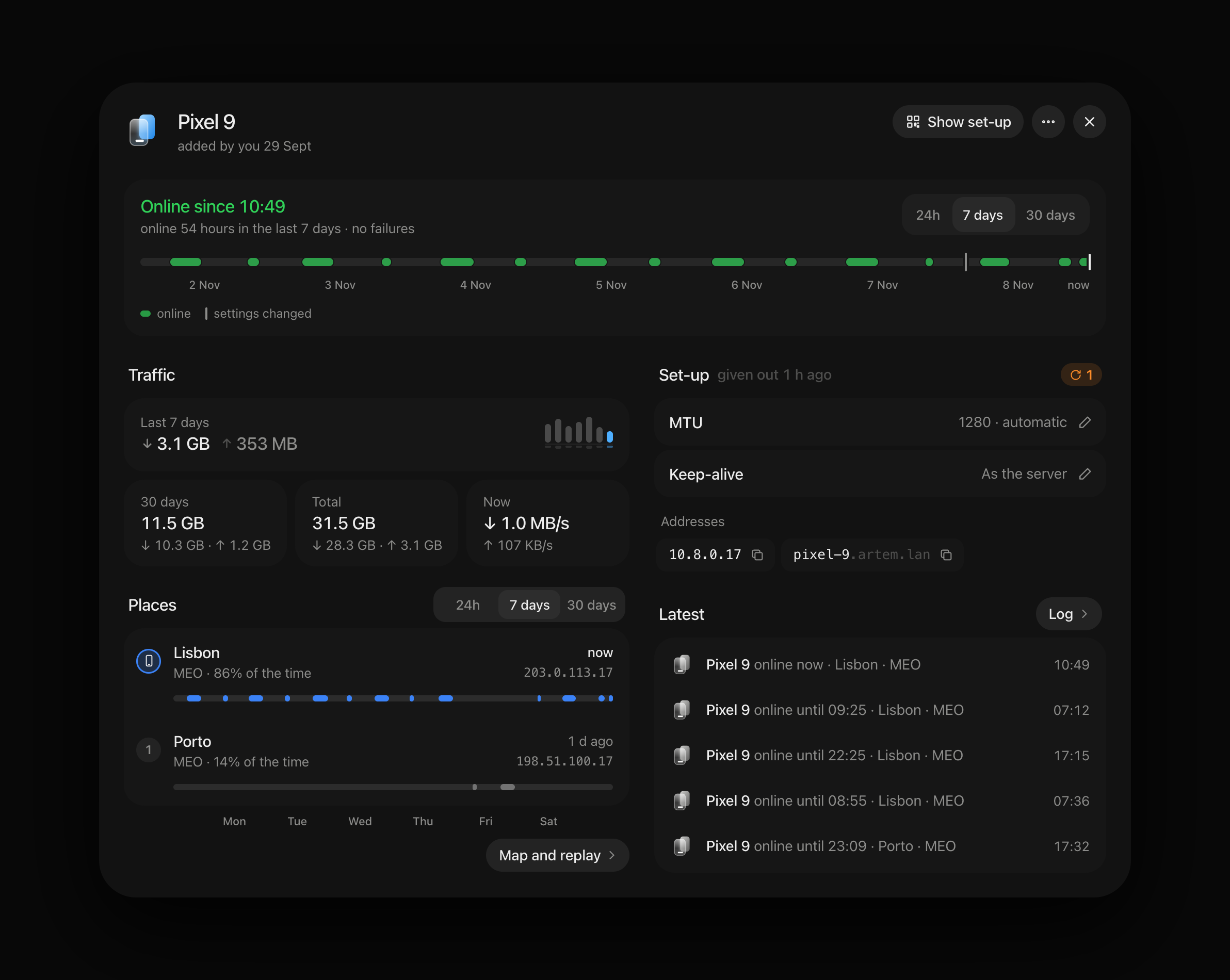
A device: when it was online, its traffic, places and set-up

A device: when it was online, its traffic, places and set-up.

A server's core: the disguise, MTU and keep-alive of its AmneziaWG tunnel

A server's core: the disguise, MTU and keep-alive of its AmneziaWG tunnel.

## 📋 Requirements | | What Dawnline needs | |---|---| | **OpenWrt** | 24.10 (opkg, `.ipk`) or 25.12 (apk, `.apk`) | | **AmneziaWG** | `kmod-amneziawg`, `amneziawg-tools`, `luci-proto-amneziawg`: the installer adds a build made for your firmware when they are missing | | **Free flash** | about 2 MB | ## 📥 Install ```sh sh -c "$(wget -qO- https://raw.githubusercontent.com/tickcount/luci-app-dawnline/main/install.sh)" ``` The installer checks the firmware, the clock, free space and DNS, lets you pick a release (the latest is the default), shows the plan and asks before it changes anything. It downloads the package for your package manager, checks it against `sha256sums.txt`, installs AmneziaWG built for your firmware if it is missing, then installs Dawnline (with its Russian translation when LuCI is in Russian) and checks that LuCI can reach it. > [!NOTE] > Before changing anything it saves `/etc/config/{dawnline,network,firewall,dhcp,uhttpd}` > and the service state to `/etc/dawnline/installer-backups/` (the newest three > are kept), and puts them back if a step fails. Packages are not rolled back: > to return to an older release, run the installer with `--tag`. Everything it > does is logged to `/tmp/dawnline-install.log`.
Installer options
With options, download it first: ```sh wget -O /tmp/dawnline-install.sh https://raw.githubusercontent.com/tickcount/luci-app-dawnline/main/install.sh sh /tmp/dawnline-install.sh --dry-run # check everything, change nothing sh /tmp/dawnline-install.sh -y --tag 0.3.1 # a given release, no questions sh /tmp/dawnline-install.sh --awg grey # AmneziaWG from 2Grey sh /tmp/dawnline-install.sh --lang ru # with the admin's Russian translation ``` | Option | | |---|---| | `-y`, `--yes` | No questions: the latest release (or `--tag`) and the recommended choices | | `-n`, `--dry-run` | Check the system, resolve, download and verify the release; change nothing | | `-v`, `--verbose` / `-q`, `--quiet` | More detail / only warnings and errors | | `--tag X.Y.Z` | A given release (`sh install.sh 0.3.1` works too) | | `--awg auto\|slava\|grey\|skip` | Where AmneziaWG comes from when it is missing: [Slava-Shchipunov], then [2Grey] (`auto`, the default), only one of them, or not at all (install it later from **Dawnline → Settings → Updates**). `DAWNLINE_AWG` does the same | | `--no-awg` | Same as `--awg skip` | | `--lang auto\|ru\|none` | The admin's translation, `luci-i18n-dawnline-`: `auto` (the default) adds it when LuCI is set to that language or has its LuCI translation; `none` adds none. An installed one is always kept up to date. Later: **Dawnline → Settings → Updates**, Dawnline's ⋯. `DAWNLINE_LANG` does the same |
When GitHub is slow or blocked
The installer retries downloads through `ghfast.top` and `gh-proxy.com` on its own. To fetch the installer itself through a mirror: ```sh sh -c "$(wget -qO- https://cdn.jsdelivr.net/gh/tickcount/luci-app-dawnline@main/install.sh)" sh -c "$(wget -qO- https://ghfast.top/https://raw.githubusercontent.com/tickcount/luci-app-dawnline/main/install.sh)" ```
Installing by hand
From a [release](https://github.com/tickcount/luci-app-dawnline/releases): ```sh opkg update && opkg install ./luci-app-dawnline-0.1.0.ipk # OpenWrt 24.10 apk update && apk add --allow-untrusted ./luci-app-dawnline-0.1.0.apk # OpenWrt 25.12 ``` The Russian translation is `luci-i18n-dawnline-ru-` from the same release, installed the same way after the app (then `/etc/init.d/uhttpd restart`).
**Upgrade** from Dawnline › Settings › Updates, or run the installer again. Settings, keys and history are kept, and a backup is made first. ### Remove ```sh sh -c "$(wget -qO- https://raw.githubusercontent.com/tickcount/luci-app-dawnline/main/uninstall.sh)" ``` It backs up the configuration to `/etc/dawnline/backups`, runs Dawnline's own removal (the same as Settings › Remove Dawnline), removes the package and cleans up what is left. After installing Dawnline again, restore the backup in Settings › Backups. > [!IMPORTANT] > AmneziaWG stays installed, since other tunnels may use it. Add `--remove-awg` > to take it away too.
Uninstaller options
With options, download it first: ```sh wget -O /tmp/dawnline-uninstall.sh https://raw.githubusercontent.com/tickcount/luci-app-dawnline/main/uninstall.sh sh /tmp/dawnline-uninstall.sh --dry-run ``` | Option | | |---|---| | `-y`, `--yes` | Do not ask for confirmation | | `-p`, `--purge` | Also delete the configuration, keys, history and every backup (`/etc/config/dawnline`, `/etc/dawnline`); no backup is made | | `--remove-awg` | Also remove AmneziaWG, unless another interface still uses it (`--keep-awg`, the default, keeps it) | | `-n`, `--dry-run` | Show what would be removed; change nothing | By hand: Settings › Remove Dawnline (keeps a backup), then `opkg remove luci-app-dawnline` or `apk del luci-app-dawnline`.
## ❓ FAQ
Which apps do people use?
AmneziaVPN or AmneziaWG on phones and computers, V2RayTun on Android (its `awg://` link; not with the Maximum disguise, which it cannot run yet), and plain WireGuard when the disguise is off. The portal shows each person the app for their system and how to add the connection in it.
What happens when someone loses their link?
Make a new one on their page. The old link stops working at once; their devices keep working, unless you tick the ones to remove with it.
Can another place's whole network join (site to site)?
Yes. Add that place's router to a person as a device of the kind «Router» and name the networks behind it (a server's Settings → Network → «Networks behind people's routers»). The tunnel then carries them both ways: home devices and people with home access reach hosts there, and hosts there reach what the router's owner reaches. A person can also ask for a router and its networks on their own page; you accept or decline each (or let them be added at once, per server). The two ends need different addresses: a network that overlaps your home network, a tunnel or another router's network is refused. The far router must route its network into the tunnel without NAT, or your home will not reach hosts behind it. Hosts at home reach it only where this router is their gateway (or they have a route to that network through it).
Does it touch the rest of my router?
Only what it created, and `dawnline teardown` removes all of it. The full list is under [What Dawnline changes on the router](#-what-dawnline-changes-on-the-router).
How do I move to another router?
Export JSON in Settings › Backups on the old one, install Dawnline on the new one and import the file there.
Where do the places on the map come from?
From the address a device connects from, looked up at city level and cached on the router. It can be turned off in Settings › History and storage.
## 🧾 What Dawnline changes on the router Only objects it created: network interfaces tagged `_dawnline`, firewall sections named `dawnline_*`, the `inet dawnline` nft table, `/tmp/hosts/dawnline`, the `dawnline` network namespace with its two veth links (`dlx0`, `dll0`, the latter a port of the LAN bridge, which needs `kmod-veth`), policy rules for the tunnel interfaces with one routing table, routes to the networks behind people's routers (routing protocol 205 in the main table), a second dnsmasq instance on port 5354 (`/var/etc/dawnline-dns.conf`), a cron line for the agent's heartbeat check and, while the portal is on, a uhttpd instance for it. `dawnline teardown` removes all of them. Data lives in `/etc/config/dawnline` (mode 0600, contains private keys) and `/etc/dawnline/` (usage, events, issued configurations, backups). Live counters are kept in `/var/run/dawnline` and flushed to flash at most hourly. Access changes reach the tunnel with `awg syncconf`, without restarting the interface; `dawnline log` on the router shows the service log. Everything service-related also goes to the router's system log, one line per event with its syslog priority: `logread -e dawnline` shows `[info] [service] starting`, `[info] [apply] configuration applied in 310 ms · …`, tunnels and the portal going down and back, crashes with what syslog knew about them, every settings change (`admin changed settings · domain: lan → home`) and people's and devices' changes. Settings → History and storage → System log picks the level: errors, warnings, normal or verbose (each step of a start and an apply). ## 🧰 Development ``` package/luci-app-dawnline/ root/usr/share/ucode/dawnline/ ucode library: model (core), AmneziaWG (awg), apply, live, ops, view, loop, portal root/usr/share/rpcd/ucode/ luci.dawnline RPC object root/usr/libexec/dawnline/ agent (usage, limits, presence) and updater root/usr/share/dawnline/portal/ portal CGI wrapper and its (minified) assets root/usr/bin/dawnline command line (`dawnline help`) htdocs/ LuCI views and the generated modules dawnline/app.js (pages), style.js (their stylesheet), map.js (the map, loaded on demand) po/ the admin's string catalog (dawnline.pot, ru/dawnline.po) web/ TypeScript sources of the admin UI and the portal web/i18n/ catalog tools: collect strings, merge .po files, compile .lmo build/Dockerfile package build with the OpenWrt SDK scripts/ build, deploy and check scripts ``` ```sh cd web npm ci npm run format # Prettier npm run ci # format check, types, lint, unused code, catalogs, tests, minified bundles npm run i18n # collect new strings into the catalogs (then translate them in ru.po) scripts/lint-ucode.py # static ucode checks scripts/check-ucode.sh root@router # compile every ucode file on a router scripts/deploy.sh root@router # install the working tree (backs up configs first) scripts/build-packages.sh all # .ipk and .apk with the OpenWrt SDK in Docker scripts/capture-screenshots.mjs # the admin's README screenshots from its demo (no router; needs a build of the Outline theme beside) scripts/capture-portal.mjs # the portal's from its demo; both in English and Russian scripts/frame-screenshots.py # frame them for this README ``` The web bundles are built, not committed (`npm run build` before `scripts/build-packages.sh`); the catalogs are committed, and CI fails when they are out of date or a string is untranslated (`rules/i18n.md`). Pushing a tag `vX.Y.Z` (matching `PKG_VERSION`) builds the packages and their translations with the OpenWrt SDK and publishes a release with `sha256sums.txt`. ---
Made for OpenWrt · MIT license · Back to top ↑
[AmneziaWG]: https://docs.amnezia.org/ [Liminal]: https://github.com/tickcount/openwrt-liminal [Slava-Shchipunov]: https://github.com/Slava-Shchipunov/awg-openwrt [2Grey]: https://github.com/2Grey/awg-openwrt